How to Use a Callaway 300 Pro Rangefinder
Aim through the viewfinder at your target and press the measurement button to get a distance reading. The Callaway 300 Pro can account for elevation with slope mode, and its pulse can confirm when it locks onto the pin.
On this page (8 sections)
- How do you take a distance reading?
- How do you lock onto the flag?
- What does the slope switch do?
- How do you switch between yards and meters?
- What should you do if you cannot get a reading?
- What helps keep a rangefinder ready during a round?
- Is a GPS rangefinder an alternative to the 300 Pro?
- How should you use the Callaway 300 Pro during a round?
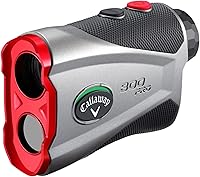
To use a Callaway 300 Pro rangefinder, aim at your target through the viewfinder and press the measurement button to get a distance. For a flag reading, hold steady until Pin Acquisition Technology locks on and the unit gives a short pulse.
The 300 Pro also measures in yards or meters, and its external switch turns slope mode on or off. Keep slope off when you need a tournament-legal reading.
How do you take a distance reading?
Point the rangefinder at the target and press the measurement button to get its distance. Aim at the flag for a pin reading, or at another object when you want that object's distance.
Hold the unit steady while aiming. If you catch a tree, bunker edge, or another object behind the flag, the reading may reflect that target instead.
The Callaway 300 Pro has 6x magnification and measures from 5 to 1,000 yards, with stated accuracy of plus or minus 1 yard. It can display distance in yards or meters.
If the number seems off, release the button, reposition your aim, and take another reading. For background on the measurement itself, see how laser rangefinders measure distance.
How do you lock onto the flag?
Aim directly at the flag and use the pulse as confirmation when Pin Acquisition Technology locks onto it. The 300 Pro's pin-locking feature works up to 300 yards away.
Keep the flag in view and avoid sweeping across nearby objects while measuring. A steady aim helps you confirm the target you intended to measure.
The pulse is a confirmation signal, not a separate distance. Read the displayed measurement after the unit confirms the lock.
What if the rangefinder reads something behind the pin?
If a reading seems too long, aim at the flag again and take another measurement. Trees or other objects behind the green can be easier for a laser to hit than a narrow flag.
Compare repeated readings while keeping your aim steady. If you still cannot get a clear pin lock, use a course marker or another distance source as a cross-check.
What does the slope switch do?
Slope mode accounts for elevation changes and calculates a slope-adjusted distance.
The 300 Pro has an external switch so you can turn this feature off.
Use the adjusted reading as added information when a shot is uphill or downhill. It is different from the straight-line distance to the target because it factors in the angle of incline or decline.
Turn slope off when you need a tournament-legal reading. The external switch makes the slope setting visible, but you are responsible for following the rules for your event.
For a broader explanation of this feature, read what the laser class in a rangefinder means. Laser class concerns the device's laser classification, while slope describes how a rangefinder handles elevation.
How do you switch between yards and meters?
Set the unit to yards or meters, then check the display before using the reading. The 300 Pro supports both units.
Pick the unit you already use for course distances so you can compare the rangefinder's number with markers and your own notes. If the display doesn't match what you expect, check the unit setting before changing your target or shot plan.
What should you do if you cannot get a reading?
Check your aim and take another measurement if the display does not show a clear distance. Keep the unit steady and focus on a visible target rather than moving the rangefinder while pressing the button.
For another laser model's operating steps, see how to use a Blue Tees rangefinder.
If the flag is hard to pick out, measure a larger object near it and use a course marker as a cross-check. Don't assume a long or unexpected reading is the pin without confirming the target.
Clean the lens with the included lens cloth, and keep the rangefinder and its controls dry. The unit is rated IPX4, but that does not mean it should be submerged.
What helps keep a rangefinder ready during a round?
Keep the rangefinder accessible, protect it between shots, and check its battery when readings stop working. The 300 Pro includes a hard carry case with a carabiner and an elastic quick-close band.
The built-in magnet can attach the unit to a golf cart frame for convenient access. Secure it when you are moving, and return it to its case when you want it protected.
This TUSITA case is compatible with Garmin Approach Z80 and Z82 models, not the Callaway 300 Pro. Choose a case made for your exact rangefinder rather than assuming accessories fit across brands.
The 300 Pro uses a lithium battery, and US units come with one included. If you need help comparing replacement options, see best batteries for golf rangefinders.
Is a GPS rangefinder an alternative to the 300 Pro?
A GPS device gives distance information without aiming a laser at each target. It can suit golfers who prefer a course display or spoken distances.
The GOLFBUDDY Voice 2S+ provides distances to the front, center, and back of the green through audio and its screen. It clips to a hat or belt, and its maker describes up to 18 hours of battery life in golf mode with GPS enabled.
Choose a laser if you want to aim at a specific target such as a flag. Consider a GPS device if green distances and hands-free access matter more to you.
For another laser option, compare the best laser golf rangefinders. You can also read our Callaway 300 Pro rangefinder review, browse best Callaway golf rangefinders, or see how a screen-based laser GPS model compares in the Garmin Approach Z82 review.
How should you use the Callaway 300 Pro during a round?
Use a steady aim for the target distance, confirm a flag lock with the pulse, and check slope before relying on an adjusted reading. Turn slope off when you need to follow tournament rules.
Choose the 300 Pro if you want a handheld laser with pin-lock confirmation and a visible slope switch. Compare it with Mileseey golf rangefinders when weighing your options.
Consider GPS instead if you prefer front, center, and back green distances without aiming at a target.
Frequently asked questions
How do you use a Callaway 300 Pro rangefinder?
Look through the viewfinder, aim at the flag or another target, and press the measurement button to take a reading. Use the 300 Pro's pulse as confirmation when Pin Acquisition Technology locks onto a pin.
Check the displayed distance, and switch slope off when you need a tournament-legal reading.
What does the vibration mean on a Callaway 300 Pro?
The short vibration, or pulse, confirms a distance when the 300 Pro's Pin Acquisition Technology locks onto the pin. Keep the target steady and aim at the flag rather than nearby trees or objects.
If the reading seems wrong, aim again and take another measurement.
Should slope be on or off on a Callaway 300 Pro?
Slope mode accounts for elevation changes and provides a slope-adjusted distance. Turn it off with the external slope switch when you need a tournament-legal reading.
The switch lets you see whether slope is enabled, but follow the competition rules that apply to your event.
Can a Callaway 300 Pro measure in meters?
Yes, it measures in yards or meters. Use the unit setting that matches how you prefer to plan shots, then keep it consistent during the round.
The unit choice changes the distance display, while slope mode separately accounts for elevation when enabled.