7 Best Golf Rangefinders for Beginners (November 2026)
The best golf rangefinders for beginners include the REVASRI Range Finder for Golf for simple controls, the HESAIN Range Finder Golf Rangefinder with Slope for multiple measurement modes, and the VISTAGET Golvia 30 Golf Range Finder for a quick flag-lock cue.
On this page (6 sections)
The best golf range finder for beginners is one with simple controls, clear yardages and a reliable flag-lock cue. The REVASRI uses a two-button layout, while HESAIN and VISTAGET add USB-C charging and extra modes.
A rangefinder can help you learn how far away a flag or other target is, but the most useful first device is one you can operate without slowing down. Think about whether you want slope-adjusted distances, how you prefer to charge, and whether extra modes will help your game.
For the basic purpose and limits of the device, see what a golf rangefinder is for. If you're wondering how far a laser can measure, our guide to the range of a golf laser explains the practical difference between a maker's maximum range and the distances that matter on a course.
Our picks at a glance
-
1
-
2
 Best for multiple measurement modes
HESAIN Range Finder Golf Rangefinder with Slope
9.6/10 our score
See it on Amazon -
3
 Best for a quick flag-lock cue
VISTAGET Golvia 30 Golf Range Finder
9.4/10 our score
See it on Amazon
- 4
 Check it
Blue Tees Golf Captain Pro Golf Rangefinder
Best for GPS and laser distances - 5
 Check it
ACEGMET PFS5 Golf Range Finder
Best for practice and course planning - 6
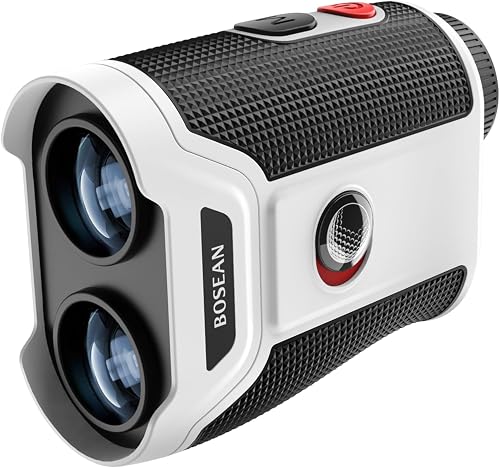 Check it
MOESAPU Golf Range Finder with Slope
Best for readable yardages - 7
 Check it
SILLAID Golf Rangefinder with Slope
Best for an external slope switch
Which golf rangefinders are easiest for beginners?
The easiest beginner models put measurement, flag confirmation and slope controls within easy reach. We compared the listed controls, target cues, charging options and extra features to match each pick to a different learning style.
Our score weighs specs, features and buyer feedback against what you're shopping for. Product scores also account for how directly each model suits a golfer who wants a manageable first rangefinder.
| Product | Best for | Controls | Flag confirmation | Power | Our score |
|---|---|---|---|---|---|
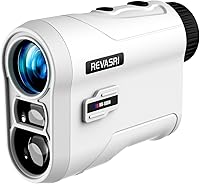
| REVASRI Range Finder for Golf | simple controls | One button measures; one changes units | Lock with vibration | Built-in Li-ion battery | 9.6 |
| HESAIN Range Finder Golf Rangefinder with Slope | multiple measurement modes | Six modes selected by button | Flag locking with vibration | USB-C rechargeable | 9.6 |
| VISTAGET Golvia 30 Golf Range Finder | a quick flag-lock cue | Dedicated slope switch | Pulse vibration | USB-C rechargeable | 9.4 |
| Blue Tees Golf Captain Pro Golf Rangefinder | GPS and laser distances | Flag lock with vibration | USB-C rechargeable | 9.2 | |
| ACEGMET PFS5 Golf Range Finder | practice and course planning | Coach Mode and slope features | Vibration and red flash alerts | USB-C rechargeable with CR2 backup | 9.1 |
| MOESAPU Golf Range Finder with Slope | readable yardages | Lock in 0.5 seconds with vibration | USB-C rechargeable | 9.0 | |
| SILLAID Golf Rangefinder with Slope | an external slope switch | External slope slider | Pulse vibration | USB-C rechargeable | 8.7 |
The best golf rangefinders for beginners
These seven rangefinders cover simple two-button operation, rechargeable power, slope switching and more advanced distance tools. Choose the simplest model that fits how you want to learn.
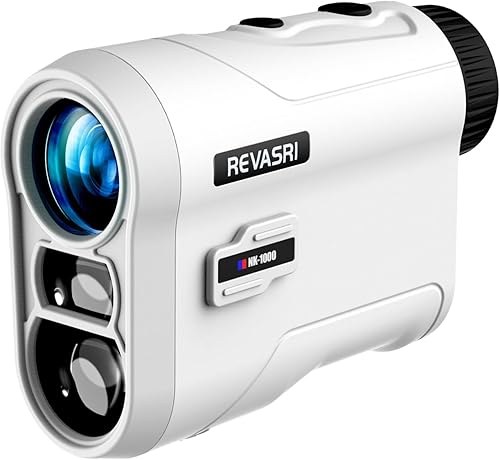
REVASRI Range Finder for Golf: Best for simple controls
- One-button measuring
- Separate meters and yards button
- Flag lock with vibration
- Slope on/off switch
Two clear controls keep the basic tasks easy to remember. Flag lock vibration adds a cue when the device recognizes the pin.
Pros
- Simple two-button layout
- Vibration confirms flag lock
- Slope can be switched off
Cons
- No magnetic mount
- Rechargeable battery type is built in
REVASRI is the clearest fit if you want a straightforward way to get started. One button measures distance, and another changes between meters and yards, so the main controls have distinct jobs.
When the device recognizes a flag, it locks the measurement and vibrates. That confirmation can help when the flag overlaps with trees or other background objects.
A switch turns slope compensation on or off. With slope active, the display shows angle, line-of-sight distance and a golf compensation distance; with slope off, it shows straight-line distance while retaining flag lock and vibration.
Choose it if you want two simple controls and a built-in battery. The compact size may also suit golfers who prefer to carry a rangefinder in a pocket or small bag.
HESAIN Range Finder Golf Rangefinder with Slope: Best for multiple measurement modes
- Six measurement modes
- 7x magnification
- Flag lock with vibration
- USB-C rechargeable
The six modes cover slope, flag lock, speed, continuous scan, horizontal distance and height. This is useful if you want room to explore features as you learn.
Pros
- Six measurement modes
- USB-C charging
- Magnetic strip for metal surfaces
Cons
- More modes mean more choices to learn
- Slope needs to be switched off for tournament play
HESAIN suits beginners who want to explore more than one way to measure. Its six modes include slope compensation, flag locking, speed measurement, continuous scan, horizontal distance and height ranging.
That range of options gives you room to learn, though it also means more choices than a basic device. Start with the mode you understand, then try another when you have a clear reason.
The 7x magnification and transflective LCD support a clear view of the target and reading. USB-C charging and a built-in magnetic strip add convenience between shots.
Choose HESAIN if you like having several measurement tools in one device. Turn slope off for tournament play when required by the event rules.
VISTAGET Golvia 30 Golf Range Finder: Best for a quick flag-lock cue
- 7x magnification
- Flag lock with pulse vibration
- Slope on/off switch
- USB-C rechargeable
A dedicated slope switch and pulse vibration provide two distinct cues. Its built-in magnet can keep it close on a golf cart.
Pros
- Pulse confirms flag lock
- Dedicated slope switch
- USB-C charging
Cons
- More features than a basic beginner may need
- The maker's stated range may exceed typical golf needs
VISTAGET makes the flag-lock cue easy to notice: a pulse vibration confirms when the flag is locked. The dedicated slope switch also makes it simple to change between adjusted and straight-line distance modes.
Its USB-C rechargeable battery and built-in magnetic mount suit golfers who want the device close at hand on a cart. The 7x magnification provides a similar viewing level to several other picks in this group.
The feature set is more than a beginner strictly needs, but the main cues are easy to identify. Use the slope switch deliberately and learn what each distance reading means before relying on it for club choices.
Choose it if a distinct vibration and visible slope switch are priorities. VISTAGET also states a 2-year warranty.
Blue Tees Golf Captain Pro Golf Rangefinder: Best for GPS and laser distances
- Laser and GPS distances
- On-screen club suggestions
- Flag lock with vibration
- USB-C rechargeable
GPS front, center and back distances join laser readings, so you can compare green position with a measured target. The connected features make it the most involved option here.
Pros
- GPS and laser in one device
- Club suggestions appear in the display
- Magnetic cart mount
Cons
- Connected features add setup choices
- May be more than a beginner needs
Blue Tees combines laser measurements with GPS distances to the front, center and back of the green. That mix can give a beginner context for choosing between a direct target and a safe landing area.
The display can show club recommendations, and the connected app includes round and shot insights. These tools create more setup and information to manage, so this is best for a beginner who wants to learn with connected features.
A flag-lock vibration, 7x magnification and magnetic cart mount cover familiar rangefinder functions. USB-C charging keeps power simple.
Choose it if you want GPS context alongside laser readings. If you prefer a quick distance without app features, a simpler model may be easier to learn.
ACEGMET PFS5 Golf Range Finder: Best for practice and course planning
- Coach Mode triangulation
- Flag lock vibration
- USB-C rechargeable with CR2 backup
- 7x magnification
Coach Mode measures between two points, which can help with practice and course planning. A rechargeable battery and CR2 backup offer two power options.
Pros
- Point-to-point Coach Mode
- Dual power options
- Flag alerts include vibration
Cons
- Triangulation adds a feature to learn
- More controls than a basic distance finder
ACEGMET adds Coach Mode, which uses triangulation to measure between two points. That can help with practice or course planning when you want to understand a ball-to-pin distance without walking between locations.
For ordinary target readings, flag lock uses vibration and a red flash alert. The device includes a USB-C rechargeable battery and a CR2 backup, so you have two power options to consider.
The feature list makes it more involved than a basic rangefinder, but the extra mode has a clear use for practice. Choose it if you want to learn distance planning beyond aiming at the flag.
MOESAPU Golf Range Finder with Slope: Best for readable yardages
- Transflective LCD
- 7x magnification
- Flag lock with vibration
- USB-C rechargeable
A transflective LCD is designed to remain readable in sun or shade. Continuous scan mode can track multiple targets when you want to compare distances.
Pros
- Display designed for sun or shade
- Continuous scan mode
- Built-in magnets
Cons
- Several modes require learning
- Slope must be off for tournament play
MOESAPU's transflective LCD is designed to stay readable in sun or shade, a useful feature when the light changes during a round. Its flag lock gives vibration feedback, and continuous scan mode can measure multiple targets.
The built-in magnets offer a place to attach it to a cart or metal club. USB-C charging and a battery indicator provide familiar power management.
There are several modes to learn, including slope and continuous scan. Choose it if a readable display matters more to you than keeping the feature set very basic.
SILLAID Golf Rangefinder with Slope: Best for an external slope switch
- External slope slider
- Flag lock with pulse vibration
- 7x magnification
- USB-C rechargeable
The external slider makes the slope setting visible at a glance, with a red or green indicator. It offers several measurement modes beyond basic distance.
Pros
- Visible slope on/off switch
- Pulse confirms flag lock
- USB-C charging
Cons
- Multiple measurement modes add choices
- Mode details may take practice
SILLAID's external slope slider is its clearest beginner-friendly distinction. A red or green indicator shows the switch position, which makes it easier to check whether slope compensation is on.
Flag lock uses pulse vibration, while the device also offers line distance, horizontal and vertical measurements, and speed measurement. Those extra modes can be useful, but take time to learn one at a time.
USB-C charging and 7x magnification round out the main features. Choose it if you want a visible slope control and don't mind having several modes available.
Which beginner features matter most?
A beginner benefits most from features that make the distance reading easy to get and understand. Start with simple measurement controls, a flag-lock cue, and a clear way to switch slope on or off.
Is a simple golf rangefinder better for beginners?
A simple golf rangefinder can be easier to learn because you have fewer modes to sort through. The REVASRI's one-button measuring and separate unit button make its main tasks clear.
You may prefer HESAIN, ACEGMET or Blue Tees if you want to explore more functions. Consider whether you'll use those tools often enough to justify learning additional controls.
Does flag lock with vibration help new golfers?
Flag lock with vibration gives a physical cue when the rangefinder recognizes the pin. That can help you distinguish the target from trees or other objects behind it.
It doesn't replace careful aiming. Practice by locking onto large, easy targets first, then try the flag from different positions on the course.
Should a beginner choose slope compensation?
Slope compensation can show an adjusted distance for elevation changes, which may be helpful on uphill and downhill shots. It also introduces another number to understand, so learn the straight-line reading before using adjusted yardage to guide a club choice.
Rules for slope features depend on the event. Use the switch to disable slope when tournament rules require it, and check event guidance before play.
Is a rechargeable rangefinder easier to maintain?
USB-C models avoid the need to keep a separate CR2 battery on hand, but you still need to charge the device before a round. The REVASRI has a built-in Li-ion battery, while HESAIN, VISTAGET, Blue Tees, MOESAPU and SILLAID describe USB-C charging.
ACEGMET adds a CR2 backup to its rechargeable battery. Pick the power setup that fits how you prepare your golf bag.
How can you choose a rangefinder that fits your playing style?
Choose by your first priority: easiest controls, clear flag confirmation, slope visibility, or added GPS and practice tools. A beginner doesn't need to pay attention to every feature at once.
If holding a device steady is your main concern, compare options in our guide to the best golf rangefinder for shaky hands. For larger controls or easier handling, the guide to the best golf rangefinder for seniors may also help you narrow the choices.
A smaller device can be easier to pack, so see our best compact golf rangefinders if bag space is a priority. Keep in mind that compact size alone doesn't determine how easy a model is to aim.
What should you check before your first round?
Before your first round, learn the unit setting, measurement button, flag-lock cue and slope switch. Try them at a practice area so you can read the distance without holding up play.
Use the straight-line distance as a starting point when learning how far you hit each club. Slope-adjusted yardage can add context, but it doesn't tell you exactly how a shot will travel.
Which beginner golf rangefinder should you choose?
Choose REVASRI for simple controls, HESAIN or VISTAGET for rechargeable options with clear flag-lock cues, and Blue Tees if you want GPS with laser distance. Pick ACEGMET for point-to-point practice, MOESAPU for a display designed for changing light, or SILLAID for a visible slope switch.
Our top 3 picks at a glance
-
1
-
2
Best for multiple measurement modes
HESAIN Range Finder Golf Rangefinder with Slope
9.6/10 our score
See it on Amazon -
3
Best for a quick flag-lock cue
VISTAGET Golvia 30 Golf Range Finder
9.4/10 our score
See it on Amazon
Frequently asked questions
What should a beginner look for in a golf rangefinder?
Look for controls you can learn quickly, a clear distance display and a flag-lock cue such as vibration. A separate switch for slope can make it easier to see whether adjusted yardage is active.
Choose features around how you play.
You may not need GPS or multiple scan modes when a simple target distance is enough.
Is slope useful for a beginner?
Slope can show an adjusted distance for uphill or downhill shots, which may help you understand how terrain changes a shot. It adds another reading to interpret, so learn the straight-line distance too.
For tournament play, check the rules and switch slope off when required.
Do beginners need a rangefinder with many modes?
No. A basic distance reading and a reliable flag-lock cue may cover what many new golfers need.
Extra modes such as continuous scan, speed measurement or triangulation can be useful later, but they add controls to learn.
Start with the feature you will use on most shots.
Are golf rangefinders hard to aim?
A rangefinder takes practice because you need to hold it steady and find the target through the viewfinder. Flag lock with vibration can confirm when the device has recognized the pin.
Try aiming at a large target first, then move to the flag when you are comfortable with the controls.
Can beginners use a rangefinder in tournaments?
That depends on the event rules and the device settings. Slope compensation may need to be turned off, and some competitions limit other features.
Check the event rules before play and use a device setting that complies.
A switch alone does not determine whether every feature is allowed.