How to Use a Garmin Approach S50
To use a Garmin Approach S50, charge it, pair and update it with Garmin Golf, then choose your course before play. During the round, use the watch to check green distances, hazards, and other available golf features.
On this page (8 sections)
- How do you set up the Garmin Approach S50?
- How do you start a golf round?
- How do you read distances during play?
- How do you record a shot or score?
- What can you do if the yardage seems wrong?
- Can you change the Approach S50 band?
- How do you make the S50 useful without slowing down?
- How to use a Garmin Approach S50: what should you remember?
To use a Garmin Approach S50, charge it, connect it to Garmin Golf for setup and updates, then start a golf activity and select your course. During play, use its GPS yardages to plan shots, check the hole and green, and record scores or other details if those features are enabled.
Before teeing off, confirm that the watch has located the course and is showing the correct hole. Keep the screen easy to read and use the watch's on-screen prompts to move through the round.
How do you set up the Garmin Approach S50?
Charge the watch and follow Garmin's pairing instructions in the Garmin Golf app. A phone connection can help you complete setup and check for updates before your round.
Start with the Garmin Approach S50 manual for button and touchscreen controls, charging, and first-use steps. Pair the watch with the app as directed, then review its device settings and available course updates while you have a reliable connection.
Course files and software are easier to check before arriving at the course. If you play somewhere new, confirm that course coverage is available and let the watch sync before relying on it for distances.
For context on how these devices work, see what a GPS golf watch is. If you are comparing Garmin models, our guide to the best Garmin golf GPS watches can help you choose a watch that fits your routine.
How do you start a golf round?
Open the golf activity and select the course the S50 finds nearby. If it asks for a starting hole or tee, make the selection that matches your round.
Take the watch outside with a clear view of the sky while it acquires GPS. Buildings, dense trees, and starting play before the signal settles can make the first reading less dependable.
Check that the course name and hole number are correct before using the yardage. If the watch selects a nearby course with a similar name, use the course list to choose the right one.
What if the S50 cannot find your course?
Check the course name, GPS signal, and course updates before starting. Move to an open area, wait for the watch to finish locating satellites, and review Garmin Golf for available updates.
If the course still does not appear, consult Garmin support or the S50 manual for current coverage and update options. Don't assume a missing course can be added instantly, so bring another way to estimate distances if you need one that day.
How do you read distances during play?
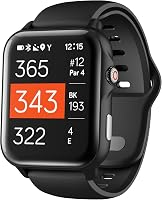
Use the front, middle, and back of the green as reference points for your next shot. Compare those yardages with the hole layout and your own club distances before choosing a target.
A center reading gives a useful starting point, while front and back readings show how much room there is around the pin. The actual flag can sit closer to either edge, so don't treat the green's center distance as the pin distance.
Look for hazard distances and other course information when planning a shot that needs to avoid trouble. Keep the watch's display in view, but follow course rules and stay aware of players around you while checking it.
GPS yardages are estimates and can vary with satellite reception and course mapping. Read more about how accurate a GPS golf watch is before treating a displayed number as an exact measurement.
How do you use the S50 on a new hole?
Confirm the displayed hole before taking your first shot. Many golf watches advance automatically, but check the hole number after moving between tees or when your route differs from the usual sequence.
If the hole does not advance as expected, follow the watch's on-screen controls to select the correct hole. Avoid changing settings while walking into another player's line or delaying a group behind you.
How do you record a shot or score?
Use the golf activity's on-screen controls for any scoring or shot-tracking feature you want to use. Check the manual first so you know which action records a score, advances a hole, or marks a shot.
If you use shot tracking, follow the same routine each time and make sure the watch registered the action. A GPS distance can help you review a shot, but it won't tell you whether the cause of a result was club choice, contact, or course conditions.
You can also keep the round simple and use the watch for yardages only. Turn on extra features only if they help your play and you can operate them without slowing down.
What can you do if the yardage seems wrong?
Wait for a clear GPS signal and verify the hole and course first. A wrong course or hole can make a distance look inaccurate even when the watch has a satellite fix.
Compare the displayed green distances with a known course marker or another reliable reference. If the difference continues, check Garmin's course updates and troubleshoot with the S50 manual.
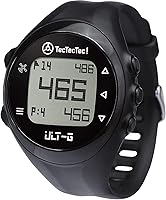
For a simpler watch with front, center, and back distances, the TecTecTec ULT-G has five buttons, a clear display, and automatic hole progression.
The ULT-G works independently during a round, and its maker says the watch has more than 38,000 preloaded courses. It also includes hazard distances and shot-distance measurement.
Can you change the Approach S50 band?
You can replace a band if the replacement matches the S50's connection and size. Check Garmin's instructions and the band maker's compatibility details before removing the original.
The QGHXO replacement band is described as compatible with the Approach S50 and uses a 20 mm quick-release connection. Its silicone band has a pin-and-tuck closure, and the watch itself is not included.
The hemsut h band is made for Garmin QuickFit watches in 20 mm, 22 mm, and 26 mm widths. Its compatibility details focus on listed QuickFit models, so confirm that the S50's connector and lug clearance match before choosing it.
For more options, compare the best Garmin Approach S50 watch bands. If you prefer another Garmin watch's controls, see how to use a Garmin Approach S12 and how to use a Garmin Approach S44.
How do you make the S50 useful without slowing down?
Set up the course and settings before play, then use only the readings you need between shots. That keeps your routine focused on choosing a target and preparing for the next swing.
Check the hole and green distances as you approach your ball, then put the watch away while others are hitting. If you use scoring or shot features, learn the controls before the round rather than exploring menus on the tee.
The Garmin Approach S50 review covers the watch in more detail. For a compact Garmin option, see how to use a Garmin Approach G12.
How to use a Garmin Approach S50: what should you remember?
To use a Garmin Approach S50, pair and update it before play, select the right course, and verify the hole before trusting a yardage. Use front, middle, back, and hazard distances as planning references, with room for GPS and course-map variation.
Choose the S50 if you want a golf watch with connected setup and on-course GPS features. Compare it with the Garmin Approach S70 review.
If you want fewer controls, consider a simpler distance watch; if you change bands, confirm the attachment type and width before ordering.
Frequently asked questions
How do I start a round on the Garmin Approach S50?
Charge the watch, open its golf activity, and let it find nearby courses using GPS. Select the course and confirm the starting hole if prompted.
Keep the watch outside and in a clear view of the sky while it locates satellites, then check the displayed hole and distances before your first shot.
Does the Garmin Approach S50 need a phone during a round?
The watch uses GPS to provide course distances, so keep the watch with you during play. A compatible phone and Garmin Golf app can help with setup, updates, and connected features; check Garmin's current instructions for which features require a phone or connection.
How do I get course updates on an Approach S50?
Connect the watch with Garmin Golf and check for available software and course updates before your round. Use the app's device instructions and keep the watch charged during updates.
Course coverage and update steps can vary, so confirm your course is available before relying on the watch.
Can the Garmin Approach S50 measure shot distance?
A golf watch may offer a shot-measurement feature, but the steps depend on the S50's current software and settings. Check the watch's golf menus or Garmin's S50 manual for the exact control, then use it consistently from the same point on each shot for a useful distance estimate.