How to Use a Garmin Approach S12
To use a Garmin Approach S12, charge it, let it find GPS, choose your course, and start the round. Check distances to the green and hazards as you play, and use the watch buttons to move through its golf screens.
On this page (7 sections)
- How do you set up the Garmin Approach S12 before a round?
- How do you start a round on the S12?
- How do you read distances during a golf round?
- What should you do if the S12 shows the wrong course or distance?
- How do you care for the S12 between rounds?
- Which accessories can help you use a golf GPS watch?
- What is the simplest way to use a Garmin Approach S12?
To use a Garmin Approach S12, charge it, let it find GPS, choose your course, and start the round. During play, use the buttons to check green distances and hazards, then move through the golf screens as needed.
The basic routine is simple: start the watch before you reach the first tee, wait for the course selection, and confirm the correct course. Once the round begins, glance at the distance for the shot you are planning and keep your focus on play.
If you are comparing models, see golf GPS watches for women.
How do you set up the Garmin Approach S12 before a round?
Charge the watch and take it outdoors before starting a round. A clear view of the sky helps the watch acquire GPS, and arriving a few minutes early gives it time to find the course.
If this is your first time using the watch, review its on-screen prompts and set any preferences you want before play. Check the date and time, choose yards or meters if the setting is available, and make sure the strap sits securely without being too tight.
Keep the charging cable with your golf gear if you travel between courses. For help comparing compatible options, see our guide to the best Garmin Approach S12 charging cable.
How do you start a round on the S12?
Wait for the watch to find nearby courses, select the course you are playing, and start the round. If the correct course doesn't appear, move to a more open area and allow GPS another moment to connect.
Check the course name before you begin, especially when nearby courses share a location or name. Starting on the wrong course can make the hole and distance information confusing.
If the watch doesn't find GPS, confirm that you're outdoors and that the sky isn't blocked by a roof or tall structure. Restart the course search using the watch's prompts if needed.
What should you check before the first tee?
Confirm the course, starting hole, and unit preference before hitting. A quick check helps avoid reading the wrong hole or interpreting a distance in the wrong unit.
Keep the watch face where you can read it without twisting your wrist sharply. If you're wearing a glove or carrying a bag, adjust the band so the watch doesn't slide around.
For a general explanation of how these devices work, read what a GPS golf watch is. It covers the GPS distance basics that apply during a round.
How do you read distances during a golf round?
Use the distance shown for the current hole as a planning reference, then choose a club based on your own carry distances and conditions. The number is useful for orientation, but wind, elevation, lie, and hazards still affect the shot.
Move between the watch's golf screens with its buttons. Depending on the screen, you may see distances to points on the green or course features such as hazards.
For the format trade-off, see golf rangefinder vs GPS watch.
Take a moment to check what the displayed number refers to before swinging. If you want a closer look at GPS yardage limits and typical sources of variation, read how accurate a GPS golf watch is.
How do you check hazard distances?
Open the hole's hazard information and read the distance to the relevant feature. Use that number to decide whether a layup or a more direct line fits your plan.
Hazard measurements are reference points, not a full picture of the shot. Consider where the hazard begins and ends, your ball's likely flight, and the landing area you want.
Don't assume a single yardage describes the entire hazard. If the screen lists multiple points, match each one to the feature and side of the course before choosing a target.
How do you track shot distance?
Use the watch's shot-distance function if you want to measure how far a shot travels. Follow the on-screen prompts to mark a starting point and check the result after reaching the ball.
Shot distance can help you learn your usual distances over time, but it isn't the same as a club recommendation. Record several shots in similar conditions before using a number to guide practice.
What should you do if the S12 shows the wrong course or distance?
Check GPS reception and confirm that the selected course and hole are correct. If the display still seems off, move into an open area and allow the watch to update its position.
A tree canopy, building, or other obstruction can affect satellite reception. Give the watch time to settle after you move, then compare the displayed hole and course features with what you can see.
If course information appears out of date, consult Garmin's official Approach S12 support page. It provides device-specific manuals and support options.
How do you care for the S12 between rounds?
Keep the watch clean, dry it after exposure to moisture, and charge it before the next round. Follow Garmin's care instructions for the watch and charging contacts.
Check the band and clasp before play so the watch stays secure through your swing. If you're replacing a worn or uncomfortable strap, compare options in our guide to the best Garmin Approach S12 watch band.
The S12 is one option in Garmin's golf-watch range. See our best Garmin golf GPS watch guide if you're comparing it with other models, or read the Garmin Approach S50 review for a look at another watch.
Which accessories can help you use a golf GPS watch?
A replacement GPS watch may suit you if you want a simpler alternative to the S12. Compare golf GPS watches for men if you are still choosing a model.
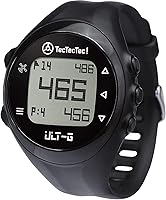
The TecTecTec ULT-G has buttons, preloaded courses, and front, center, and back green distances, according to TecTecTec.
For a band change, the QGHXO replacement band is compatible with the Garmin Approach S12 and uses a 20 mm quick-release connection. Check that the connector and fit match your watch before ordering.
The hemsut h nylon band is made for Garmin QuickFit connections, and its listed 20 mm compatibility covers select Garmin models. The Approach S12 isn't named among those models, so verify the watch connection carefully before considering it.
What is the simplest way to use a Garmin Approach S12?
For a smooth round, charge the S12, start GPS outdoors, verify your course, and check the relevant screen before each shot. Use the yardages as one input alongside your own club distances and the conditions on the course.
If you're learning another Garmin golf device, our guides explain how to use a Garmin Approach S50 and how to use a Garmin Approach G12. Pick the S12 if you want a watch-based distance reference, and take time before the round to learn its button layout.
Frequently asked questions
How do I start a round on a Garmin Approach S12?
Charge the watch, go outside with a clear view of the sky, and wait for GPS reception. Choose the course when the watch finds nearby courses, then select the option to start your round.
Button names and screen prompts can vary by software version, so follow the prompts shown on your watch.
How do I see distances on the Garmin Approach S12?
During a round, use the watch's buttons to move through the golf screens and read the distance information displayed for the current hole. The watch can show yardages to the green and course features.
Check the screen labels and your course map to understand which point each number refers to.
Can I use a Garmin Approach S12 without my phone?
You can use the S12 on the course without relying on a phone for each distance reading. GPS reception is needed, so start outdoors with a clear view of the sky and give the watch time to locate the course.
A phone may be useful for setup or software and course updates.
How do I charge a Garmin Approach S12?
Use a compatible charging cable and connect it to the watch and a suitable power source. Keep the charging contacts clean and dry, and check the watch's charging indicator before leaving for the course.
See Garmin's instructions for the cable connection and care steps for your specific device.