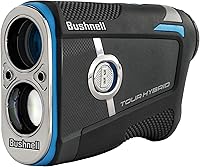
How to Use a Bushnell Rangefinder
Aim at a clear target, press the measurement button, and read the distance on the display. Adjust the eyepiece until the target looks sharp, and use slope or scan modes only when they fit the shot and rules.
On this page (7 sections)
To use a Bushnell range finder, focus the view, aim at a target, press the measurement button, and read the distance. Start with the flag or another clear target, then use the yardage to plan your shot.
Buttons and modes vary by model, so check your Bushnell manual for model-specific steps. The basics are similar: steady the unit, aim at the object you want to measure, and confirm the display shows a sensible distance.
How do you focus a Bushnell rangefinder?
Turn the eyepiece until the target and display look clear. A sharp view makes it easier to hold the crosshair on the intended object.
Look through the viewfinder at a distant object, then rotate the eyepiece slowly. Stop when both the target and any display marks are easy to see.
If the image remains unclear, check whether the lens is smudged and whether the rangefinder is set to the right measurement unit. Avoid touching the lens with rough fabric.
How do you aim and get a distance reading?
Hold the rangefinder steady, place the aiming mark on the target, and press the measure button. The displayed number is the distance to the object the laser reads.
For a golf shot, aim at the flagstick or a visible feature such as a bunker edge. Keep both hands steady and brace your arms if needed.
If the device picks up a tree or another object behind the flag, the reading may be longer than the flag distance. Try again with the aiming point held on the flagstick, and look for a flag-lock or pin-lock confirmation if your model has one.
A golf rangefinder's useful distance depends on the target and conditions. See [what is the range of a golf laser?
A handy guide](/what-is-the-range-of-a-golf-laser/) for factors that affect readings.
What if the rangefinder won't lock onto the flag?
Aim at the flagstick and steady the unit before measuring again. Small targets can be harder to isolate than large objects, especially when your hands are moving.
Try ranging a nearby tree or other fixed target first to confirm the device is responding. Then return to the flag and follow your model's instructions for pin-lock or flag-seeking mode.
If the display gives inconsistent results, check focus, battery power, and the manual's troubleshooting steps. Don't base a club choice on a reading that seems wrong.
How do you read the yardage?
Read the number shown after the rangefinder finishes measuring. Check whether the display is set to yards or meters before using that distance to choose a club.
Many golf rangefinders show line-of-sight distance. A slope mode may also account for elevation and provide a slope-adjusted distance, so note which number the display is giving you.
A rangefinder can measure the flag, hazards, and other landmarks to support course planning. For a quick overview of those uses, read what a yardage finder does.
When should you use slope or scan mode?
Use the mode that matches the measurement you need, and switch slope off when competition rules require it. Controls differ between models, so confirm the mode indicators in the manual.
Slope mode accounts for elevation changes and may show an adjusted distance alongside the direct reading. A switch or setting can disable slope on some rangefinders, but don't assume every model uses the same control.
Scan mode can take readings as you sweep across different objects. It can help compare distances to a hazard and a flag, though a steady aim is still needed for a useful reading.
A Bushnell rangefinder review can help you compare model controls and features. See the Bushnell Tour V6 Shift rangefinder review, Bushnell Pro X3 rangefinder review, and Bushnell Tour Hybrid rangefinder review.
How do you switch between yards and meters?
Use the unit control specified in your model's manual, then verify the display before measuring. Some rangefinders use a dedicated button, while others change units through a mode sequence.
Avoid switching units mid-round without checking the display. A reading in meters can be mistaken for yards if you rely on the number alone.
Which rangefinder features can make aiming easier?
Pin-lock confirmation and a clear display can help you verify that the rangefinder has read the intended target. For a model-specific example, see the Bushnell Pro X3+ Link rangefinder.
These features vary, so compare them against how you plan to use the device.
The Callaway 300 Pro Golf Laser Rangefinder has Pin Acquisition Technology that can lock onto a pin up to 300 yards away, with a short vibration confirming the distance. Its external slope switch can turn slope off for tournament play.
The REDTIGER Golf Rangefinder with Slope On/Off offers six measurement modes, including flag locking, slope compensation, and continuous scan. Its slope switch can be turned off for competition play.
The TIDEWE Hunting Rangefinder includes straight-line, vertical, horizontal, speed, and scan modes. Those options may suit a reader who also wants measurements for outdoor activities beyond golf.
For more options, compare the best Bushnell golf rangefinders. Focus on the controls and features you'll use, rather than choosing by the longest claimed range alone.
What should you check before a shot?
Confirm the target, unit, and mode before you trust a reading. That quick check helps avoid using a distance for the wrong object or misreading meters as yards.
- Check that the eyepiece is focused.
- Make sure the aiming mark is on the intended target.
- Confirm the display uses yards or meters as expected.
- Note whether slope adjustment is on or off.
- Measure again if the reading conflicts with visible course markers.
Use the rangefinder as one part of your decision. Consider the lie, wind, hazards, and your own club distances before choosing a shot.
How to use a Bushnell range finder: what is the quick routine?
For anyone learning how to use a Bushnell range finder, focus first, aim steadily, measure, and confirm the display. Recheck the mode and unit before acting on the yardage.
Choose a model with controls that suit your needs: the Callaway 300 Pro includes pin-lock confirmation and an external slope switch, while the REDTIGER has several measurement modes. The TIDEWE adds distance and scan modes for other outdoor uses.
Start with a clear target and a steady grip. If a reading seems off, focus again and take another measurement before choosing your shot.