How to Use a Garmin Approach S70
To use a Garmin Approach S70, charge it, pair it with Garmin Golf, choose your course, and start a round. Use the course map and distance screens for yardages, then save the round when you finish.
On this page (10 sections)
- How do you set up a Garmin Approach S70?
- How do you start a golf round on the S70?
- How do you read distances during a round?
- How do you use the course map and hazard distances?
- How do you track a shot with the S70?
- How do you keep score and finish a round?
- How can you make the S70 easier to use?
- Which accessories can help with fit?
- What should you do if GPS or course data seems wrong?
- How should you choose a Garmin golf watch?
To use a Garmin Approach S70, charge it, set it up with Garmin Golf, select your course, and start a round. During play, check distances and hole maps on the watch, record shots when useful, and save your score when the round ends.
The S70 is a golf GPS watch, so you can use it to view course information from your wrist instead of repeatedly checking a phone. Set it up before your tee time, then learn the few golf screens you expect to use most.
How do you set up a Garmin Approach S70?
Charge the watch and pair it with Garmin Golf before your first round. Setup gives you time to sync course data, review settings, and learn the touchscreen while you're not waiting to hit.
- Charge the watch with its supplied cable.
- Turn it on and follow the on-screen setup prompts.
- Install Garmin Golf on a compatible phone if you want to pair and sync.
- Follow the app and watch prompts to complete pairing.
- Sync the watch and check for course data or software updates.
Garmin's Approach S70 support page has current setup and troubleshooting instructions. Use Garmin's steps if the menu names or connection prompts differ from what you see.
You can also browse our guide to the best Garmin golf GPS watches if you're still comparing watch features. For another watch in the range, read our Garmin Approach S50 review.
What should you check before leaving for the course?
Confirm the watch is charged and your course is available. Doing this at home avoids troubleshooting while your group is ready to tee off.
Open the golf activity and see whether the course appears in the course list. If it doesn't, connect to Garmin Golf or Garmin Express as Garmin directs, then sync the watch again.
Wear the watch snugly enough to keep it in place, but not so tight that it feels uncomfortable. If you want to change its look or fit, compare best Garmin Approach S70 watch bands.
How do you start a golf round on the S70?
Open the golf activity, wait for GPS, choose the course, and confirm the hole. Start outdoors with a clear view of the sky so the watch can find satellites.
Choose the correct course if several nearby courses appear. Check the course name and starting hole before you begin, especially at a club with multiple layouts or a shared property.
If you start on a hole other than the first, use the watch's hole controls to select the correct one. The watch may advance holes as you move, but glance at the hole number after a turn or when playing a course with unusual routing.
What if the watch can't find your course?
Check the GPS connection and course sync first. Move to an open area, give the watch time to locate satellites, and confirm that the course data has synced.
If the course is still missing, check Garmin's support instructions for course updates and report the missing course through Garmin's available support channels. Don't assume a nearby course with a similar name is the right layout.
How do you read distances during a round?
Use the distance screen to check your position relative to the green and hazards. The exact details depend on the active screen and course data, so verify the target before choosing a club.
The S70 can show front, middle, and back distances to the green, along with course map information. A center number is a reference point, not a recommendation for which club to hit.
Use the map view to understand the shape of a hole and the location of hazards. Zoom or move around the map if needed, then return to the distance view before your shot.
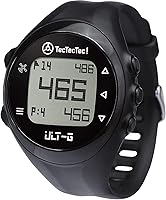
The TecTecTec ULT-G uses buttons rather than a touchscreen and includes automatic hole progression. It can suit golfers who want basic GPS distances on a separate watch without carrying a phone during the round.
Don't expect the ULT-G to operate like the S70. It is a different watch with its own screens and controls, so check its instructions if you choose it.
How do you use the course map and hazard distances?
Check hazard distances before you pick a target or lay-up spot. Use the map and available distance markers to see where trouble sits in relation to your ball.
A hazard number helps you plan, but it doesn't account for your lie, wind, elevation, or the club you hit. Combine the watch's yardage with what you can see from the course.
When the map appears crowded, focus on the next decision rather than trying to read every marker. Identify the hazard that could affect your shot and choose a target with enough room for your usual miss.
How do you track a shot with the S70?
Use the shot measurement feature when you want to record how far a shot traveled. Start the measurement at the ball, take the shot, and review the distance at the landing point.
Follow the watch prompts for the shot-tracking function. If the watch needs you to mark or confirm a point, do that before walking away from the ball.
Shot distance is useful for building a personal reference over time, but one result won't tell you what a club will do on every swing. Account for the lie, wind, temperature, and the way you struck the ball.
How do you keep score and finish a round?
Enter scores as you play, then review and save the round at the end. This makes it easier to remember each hole without trying to reconstruct the card later.
Use the scorecard controls to enter your score and any supported stats you want to track. Check the hole number before saving each entry, especially if you change holes manually.
At the end, review the scorecard for missed or incorrect entries and save the round. Sync with Garmin Golf afterward if you want the round available in the app.
How can you make the S70 easier to use?
Keep the main golf screens easy to reach and learn a small set of controls before your round. A quick practice session helps you check a yardage without pausing to search through menus.
Use the screen that answers your next question: green distance for club planning, map view for hole shape, or scorecard for recording results. Turn off or adjust alerts you don't want during play by following Garmin's settings instructions.
If you use a different Garmin golf watch, the basic routine is similar, though menus and features can vary. Our guide to how to use a Garmin Approach S44 covers that model.
Which accessories can help with fit?
Choose a replacement band only after checking the watch's connector and fit. Band compatibility depends on the watch model and attachment style.
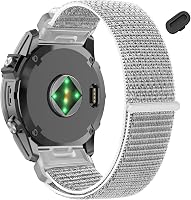
The QGHXO band is described as compatible with several Approach models, including the S50 and S44, but it does not name the S70. Check the model and connector before buying it.
The hemsut h nylon band specifically names the Approach S70 in its compatibility details. Choose the 22 mm option for the 47 mm S70 or the 20 mm option for the 42 mm S70, and confirm the connector and latch fit before wearing it.
The QGHXO band does not list the S70 as compatible, so don't order it for that watch based only on its 20 mm width. Connector type matters as well as width.
What should you do if GPS or course data seems wrong?
Check the course, hole, and satellite connection before relying on a questionable number. A wrong course or hole selection can make otherwise normal distances look incorrect.
Move into an open area if buildings or trees may be blocking the sky, then wait for GPS to settle. Check that the watch selected the right course and hole, and sync course data if the map or layout appears outdated.
If the issue continues, restart the activity and follow Garmin's current troubleshooting steps. Avoid changing several settings at once, so you can tell which step fixed the problem.
How should you choose a Garmin golf watch?
Choose the S70 if its golf screens and features match what you want to see on your wrist. A simpler watch may suit you better if your main need is front, center, and back yardages without extra controls.
The TecTecTec ULT-G is one option for straightforward button-based distances. The Garmin S70's course maps, setup, and features call for a little practice before the first round.
For indoor practice planning, see our guide to best golf simulators for home. If you already own the S70, charge it, sync course data, and rehearse the golf activity before your next tee time.
Frequently asked questions
How do I start a round on a Garmin Approach S70?
Charge the watch, go outside with a clear view of the sky, open the golf activity, and select your course when it appears. Confirm the starting hole and begin the round.
If the course doesn't appear, check the watch's location and course data, then try again.
Does the Garmin Approach S70 need a phone during a round?
The S70 can use its golf GPS features on the watch during a round. Pairing with a phone and Garmin Golf can support setup, syncing, and connected features, but keep your phone nearby if you plan to use features that depend on a connection.
How do I update courses on a Garmin Approach S70?
Use Garmin Golf and a compatible connection to sync course data, or follow Garmin's current instructions for updating the watch through Garmin Express. Keep the watch charged and connected during the update, and check that your course is available before your tee time.
Can the Garmin Approach S70 track shot distance?
Yes, the S70 includes golf features for recording shots and measuring how far a shot traveled. Start the measurement when you reach the ball, then review the distance shown on the watch.
GPS accuracy can vary with satellite reception and course conditions.